If you received a damaged item or an incorrect size, there are a few simple ways to request a replacement.
For Fix Items—Exchange During Checkout
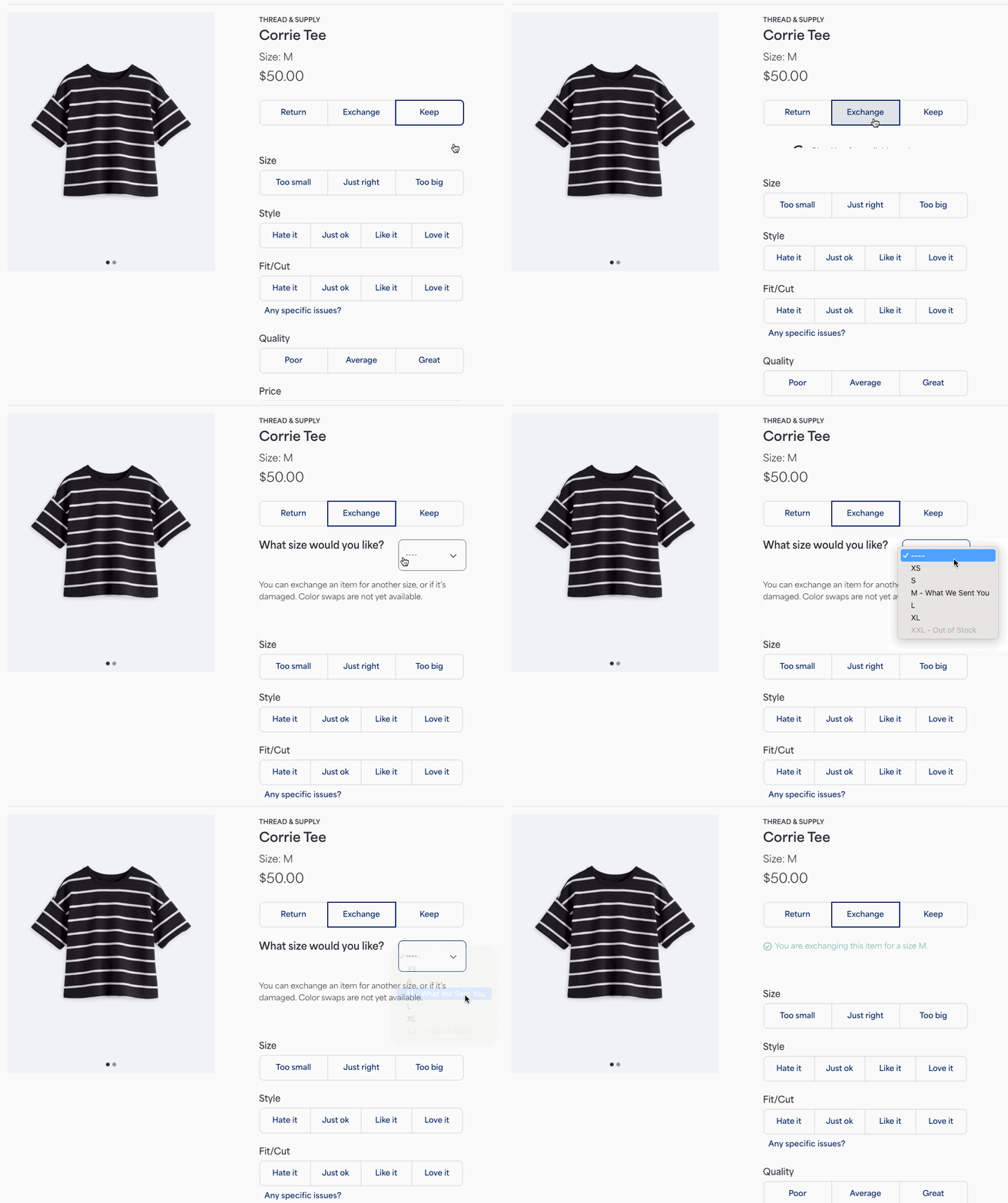
The quickest way to get a replacement for an item you received in your Fix is to exchange it during the checkout process on the website or app.
When checking out:
- Select Exchange for the item you wish to exchange
- Select the desired size you want from the exchange drop down menu
- Complete the Fix Checkout as usual
- Your exchange request is confirmed upon your payment processing
- Send the damaged item back with the other items you’re returning from your Fix
Once the replacement item ships, you’ll receive an email notification with the item’s tracking number.
For Stitch Fix Freestyle™ and Other Issues
If you need a replacement for a Freestyle order, you discover the damage after checking out for your Fix, or if the issue is complex (like a significant delivery problem), please contact our Support team over chat, text or email right away.
Since these issues are managed on a case-by-case basis, providing details upfront will help us assist you quickly.
When you contact us, please provide:
- The item name and the order or Fix number, if possible
- A brief description of the issue (e.g., "The dress has a torn seam")
If able, please also attach a photo of the damage or incorrect item to your request to help expedite the process. Once the replacement item ships, you’ll receive an email notification with the item’s tracking number.


