We understand that you may need to cancel your upcoming Fix. You can cancel your delivery directly from your account, as long as your Stylist hasn't started styling it yet.
How to Cancel Your Delivery
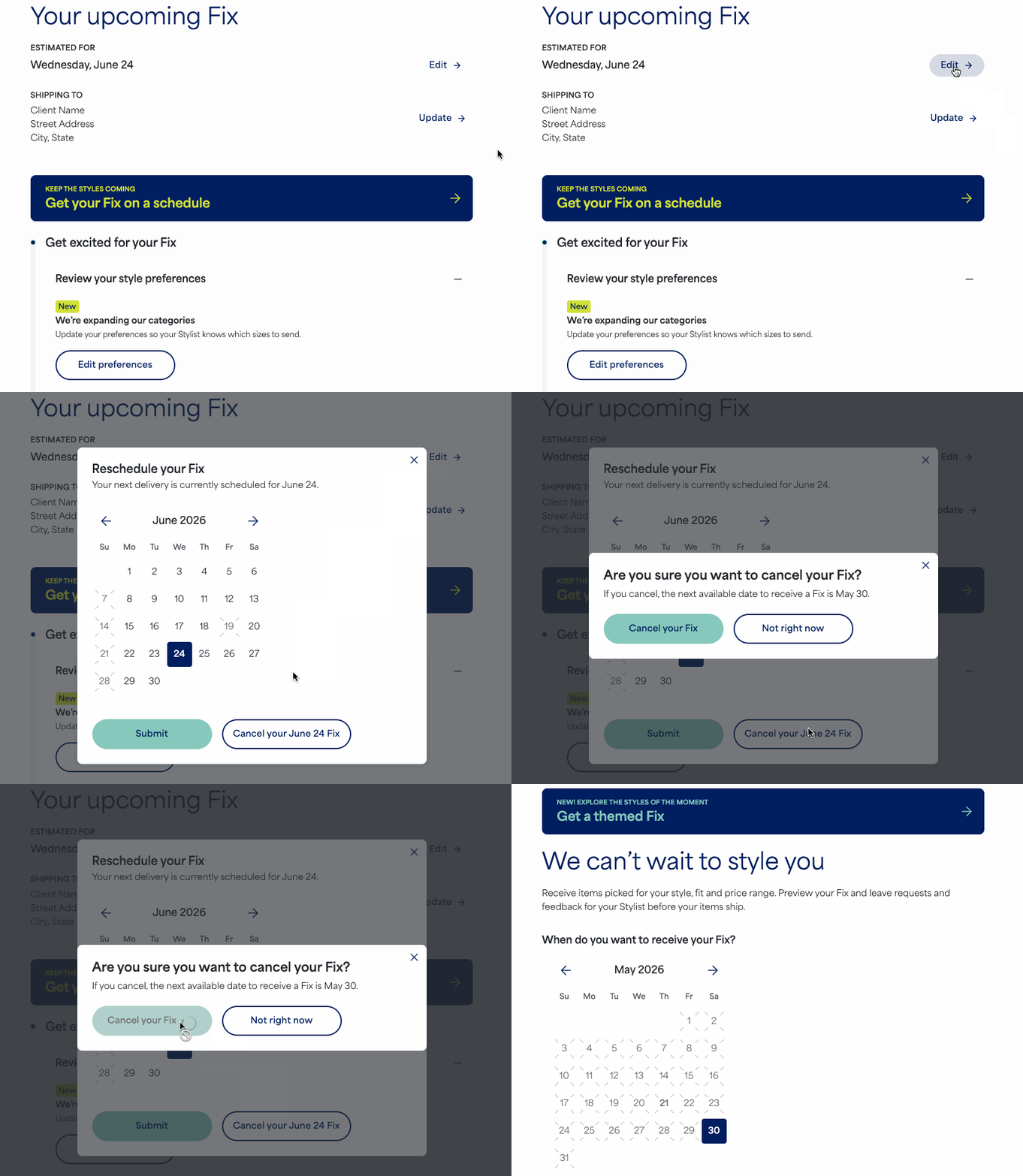
To cancel your upcoming Fix:
- Log in to your Stitch Fix account
- Navigate to the Fixessection:
- Web Browser: Look for Fix across the top navigation bar
- iOS App: Look for Fix on the bottom menu bar
- Select Edit next to the estimated delivery date
- Select Cancel your Fix
- Confirm the cancellation by selecting Cancel your Fix on the next screen
Once complete, you’ll see a calendar on the Fix homepage, asking when you want to receive your next Fix.
Important Note on Timing
Once your Stylist begins working on your Fix, you will no longer see the option to cancel. If you still need to cancel your Fix, please contact our Support team over chat, text or email right away.
Additional Tips
- Family Accounts: If you are managing multiple profiles, be sure to switch to the correct profile first before navigating to the Fixes section.
- Styling Fee Refund: If we've already charged your styling fee (this usually happens about two weeks before delivery), you don’t need to worry—it will automatically be refunded to your original payment method once the Fix is successfully canceled.


