You can adjust your Fix’s estimated delivery date up until your Stylist begins working on it.
Changing Your Delivery Date
- Log in to your Stitch Fix account
- Navigate to the Fixes section:
- Web Browser: Look for Fix across the top navigation bar
- iOS App: Look for Fix on the bottom menu bar
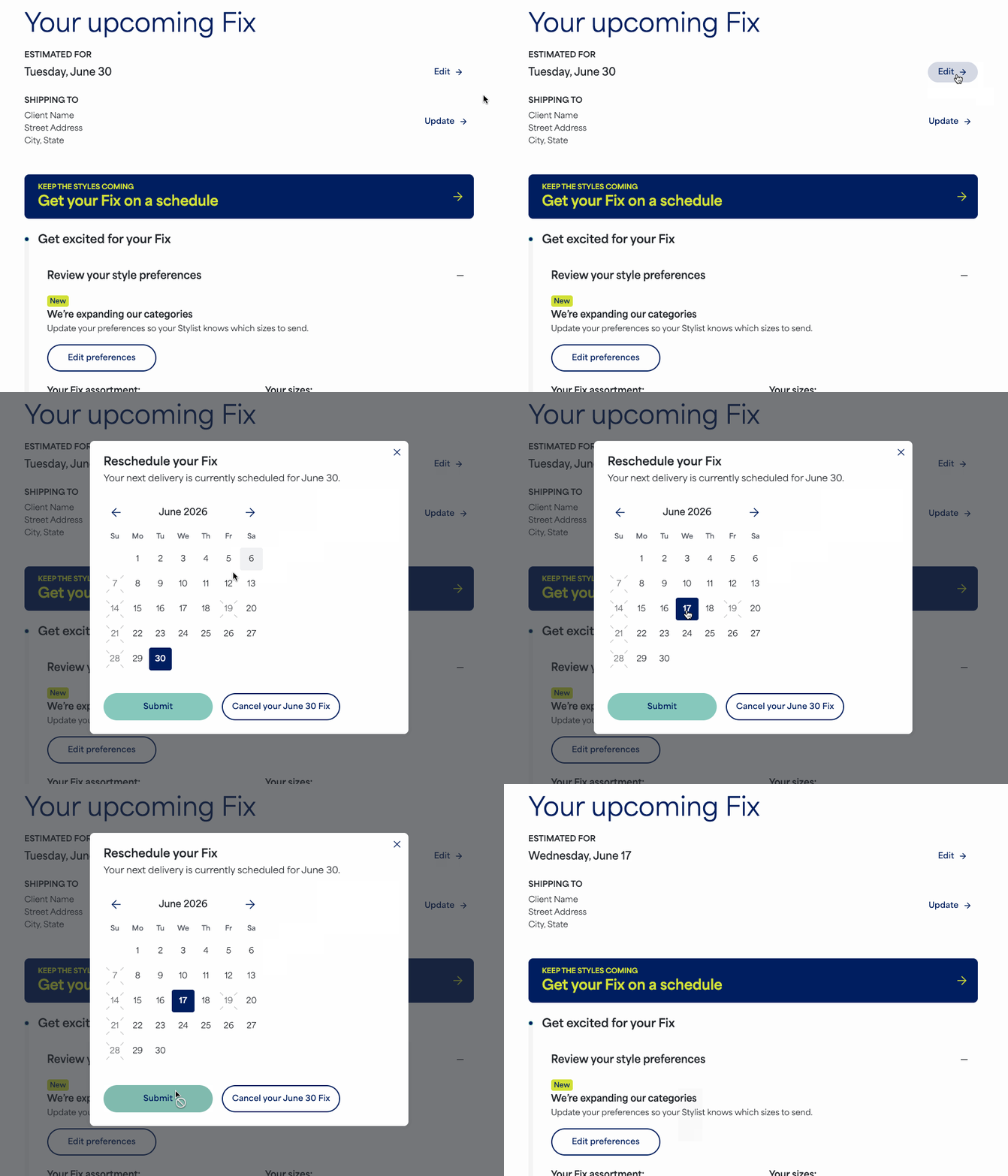
- Select Edit next to the estimated delivery date
- From the calendar, select the date that works better for you
- Select Submit
Once complete, your Fix homepage will display your newly selected delivery date.
Styling In Progress (When You Can No Longer Reschedule)
Once your Stylist begins working on your Fix, you will no longer see the option to make changes. If you still need to reschedule your Fix, please contact our Support team over chat, text or email right away.
Themed and Freestyle Fixes
Delivery dates for Themed Fixes or Fixes where you’ve selected a Freestyle item to "Get it in a Fix" are automatically selected and cannot be adjusted or rescheduled. If that date no longer works for you, the Fix must be canceled and you can simply schedule a new shipment.
Additional Tips
- Family Accounts: If you are rescheduling a Fix for another member on your Family Account, be sure to switch to their profile first before navigating to the Fixes section.
- Styling Fee: Keep in mind that rescheduling your delivery will also shift the date when your styling fee is charged, which typically occurs about two weeks before your delivery date.


