Using a promotion code is a great way to save on your Stitch Fix Freestyle™ purchases! We make it simple to apply your code right at checkout.
Applying Your Promotion Code
- Log in to your Stitch Fix account
- Browse Stitch Fix Freestyle™ and add the items you love directly to your shopping bag.
- Select the bag icon in the top right corner to open your bag
- From here you can edit your order by removing items or saving them for later
- When ready, select Checkout
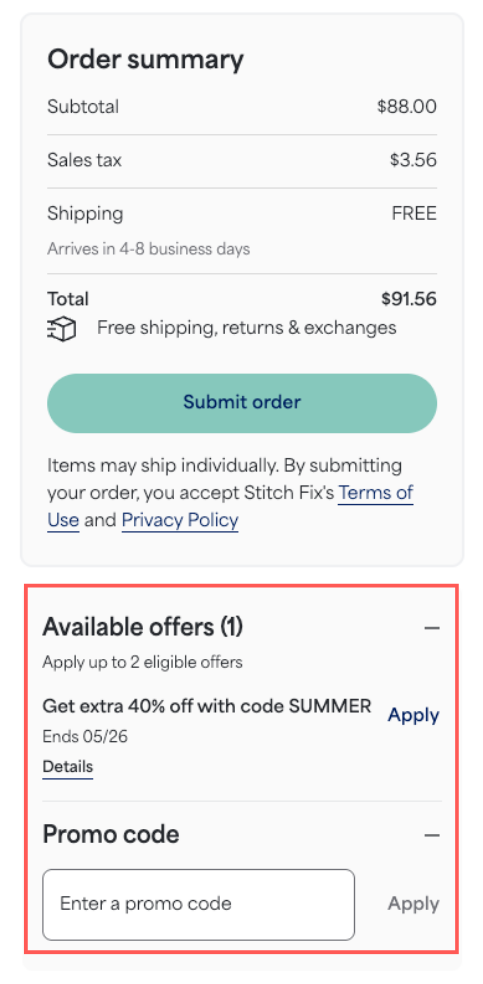
- On the checkout page, look for the option to Enter a promo code
- Enter your promotion code exactly as it appears (codes are often case-sensitive)
- Select Apply
- Check that the discount has been correctly applied to your order total before finalizing your purchase
- Select Submit order
Additional Tips
- Eligibility: Most promotion codes have specific rules, such as expiration dates or minimum purchase requirements. If your code isn't working, the item/s in your cart may not be eligible. Please review the terms of the offer.
- Need Support? If you continue to experience issues applying a code that you believe is valid, please contact our Support team over chat, text or email before completing your purchase.


