You have the option to use our AI assistant to help you write your personalized Fix request note to your Stylist.
How it Works
When you have an upcoming Fix, you’ll have the option to write a note to your Stylist.
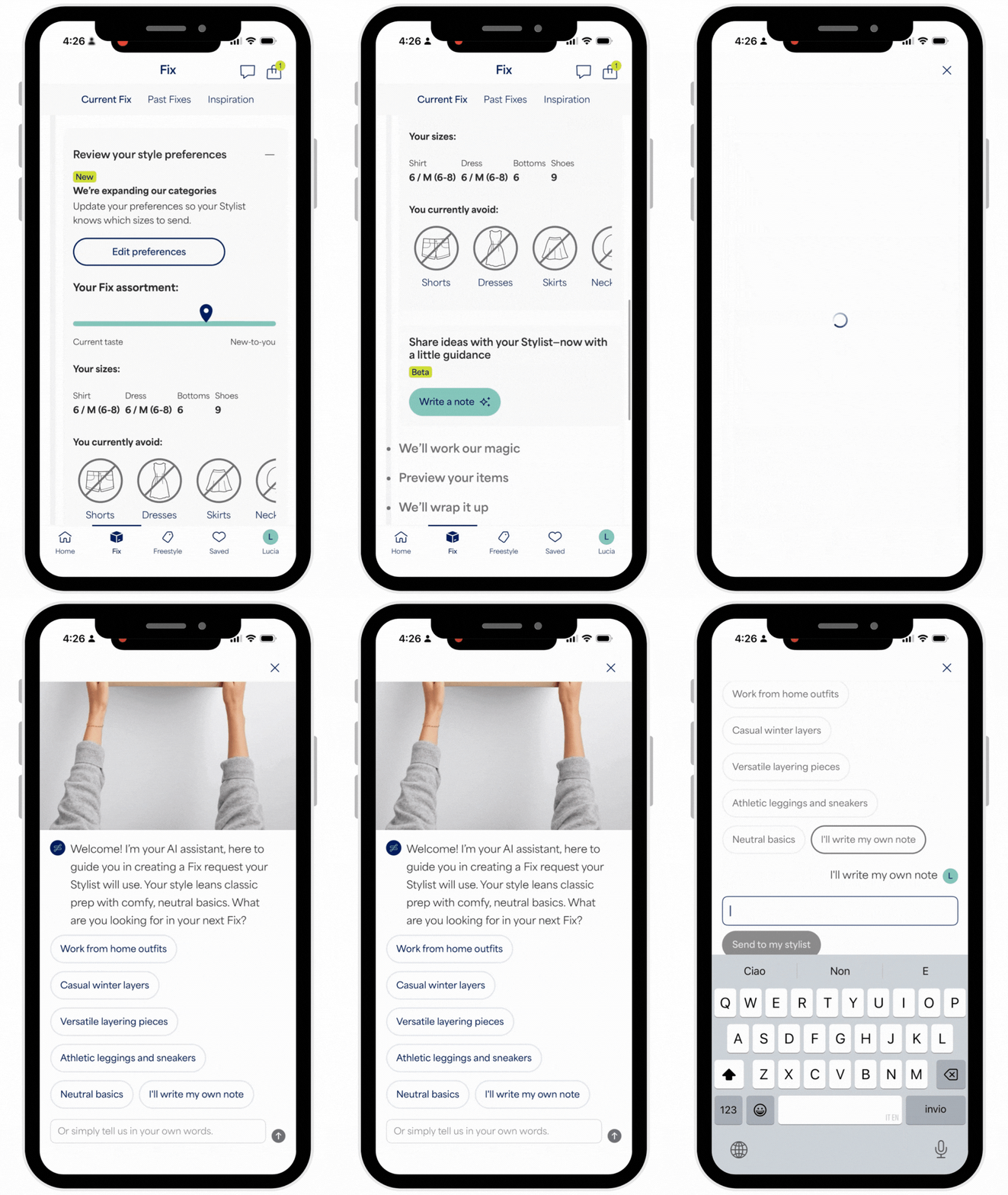
- Select Write a note, where you'll be greeted by our Stitch Fix AI Assistant
- You will be prompted with questions and shown visuals to rate
- The AI-generated inspirational visuals you select will be sent to your Stylist
- Once your note is written, either select Sounds good to save your note or Not quite right to continue chatting
If you need to make any changes to your note once it’s been saved, you can select the pencil icon to make changes. The option to edit your note will be available until we start styling your Fix.
How to Write Your Own Note
If you prefer to write your note manually, you can opt out of our AI experience:
- Select Write a note
- Select write my own note from the options presented
- A pop-up box will appear for you to write your note to your Stylist
- Once you’ve completed your note, select Send to my Stylist
Additional Tips
If you miss the opportunity to leave a note or choose not to, your Stylist will use your Style Profile, Freestyle purchases, and saved items, as well as your past Fixes, to curate a personalized shipment.


