It's easy to add a favorite item from your Stitch Fix Freestyle™ to your next Fix. Once you’ve made your selection, we'll build a Fix around the piece and take care of the rest!
How to Add a Freestyle Item to Your Fix
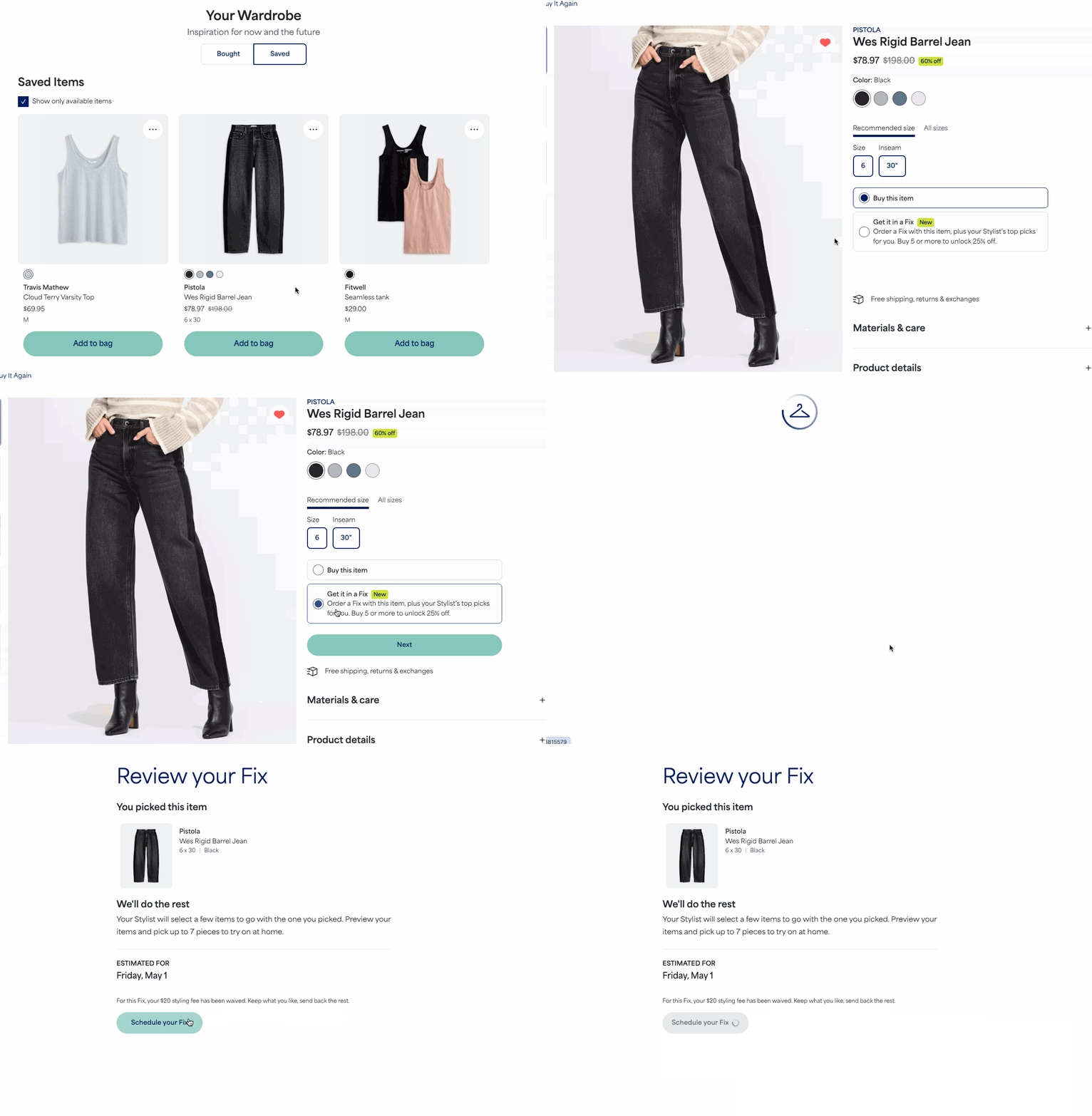
- Log in to your Stitch Fix account and start shopping Freestyle
- Select an item you love
- Look for the Get it in a Fix option, which is only available if the item can be included in a Fix
- Select Get it in a Fix and then select Next
- Review your item and the set delivery date
- Your Fix will be scheduled for the next available date (7–10 days out)
- This date cannot be adjusted
- Select Schedule your Fix to confirm your newly scheduled delivery
Note: This will be an additional Fix. It will not change your existing Fix frequency or auto-ship schedule.
After Your Fix is Scheduled
You'll still be able to leave a Fix request note for your Stylist to ask for complementary pieces, a full outfit, or any other special requests.
Why You Might Not See the "Get it in a Fix" Option
You may not see this option if the item has limited inventory. This option is also temporarily unavailable if you currently:
- Have a Fix in progress
- Extended the return date for your currently delivered Fix
You'll see the option again once your current Fix is complete or your return tracking registers.


